Sledování monitorů počítačů
Mějte přehled o tom, kde se vaše monitory nacházejí — ALVAO je nyní automaticky sleduje, takže váš inventář majetku zůstává přesný bez manuální námahy.
Co to je?
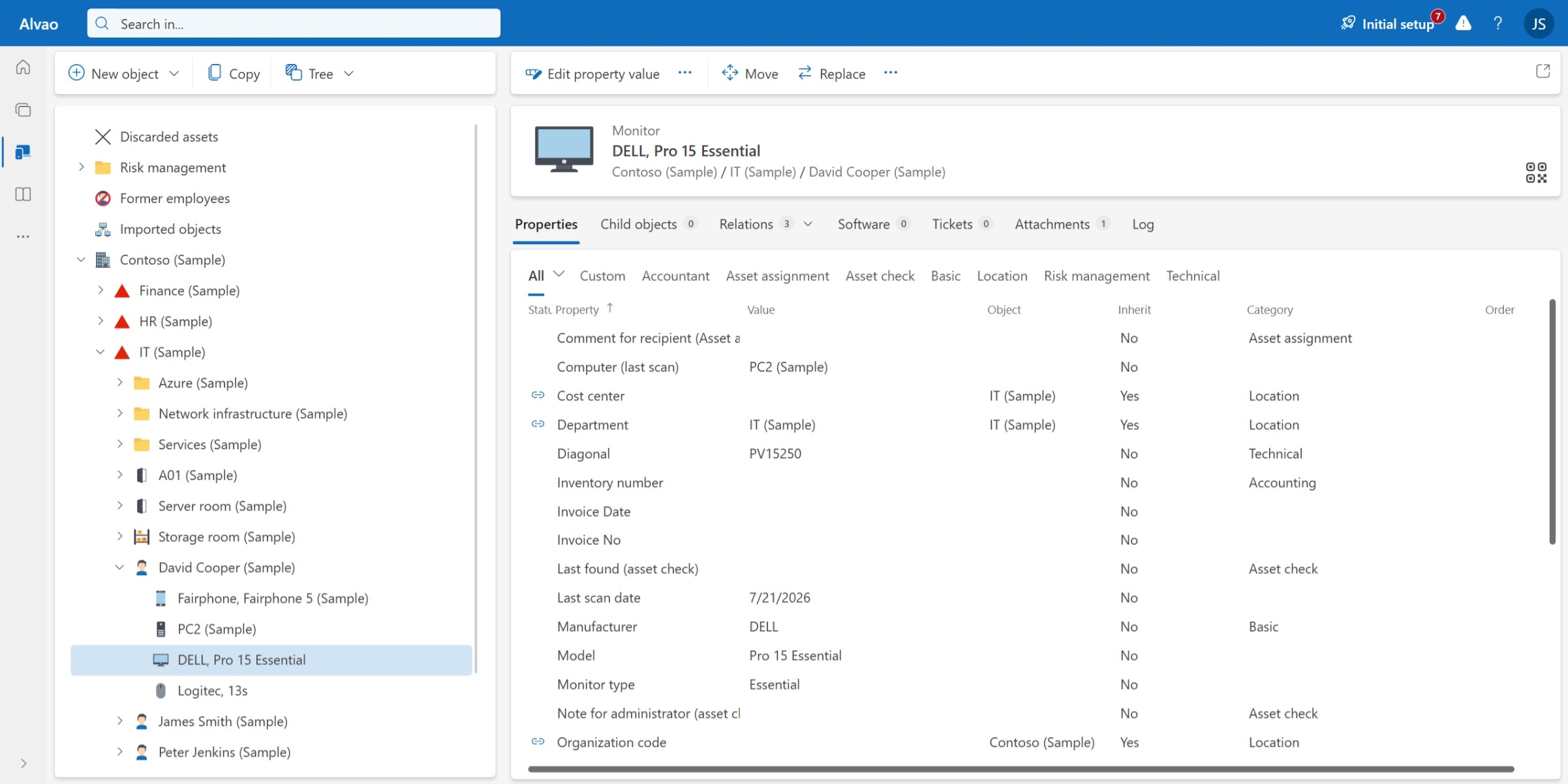
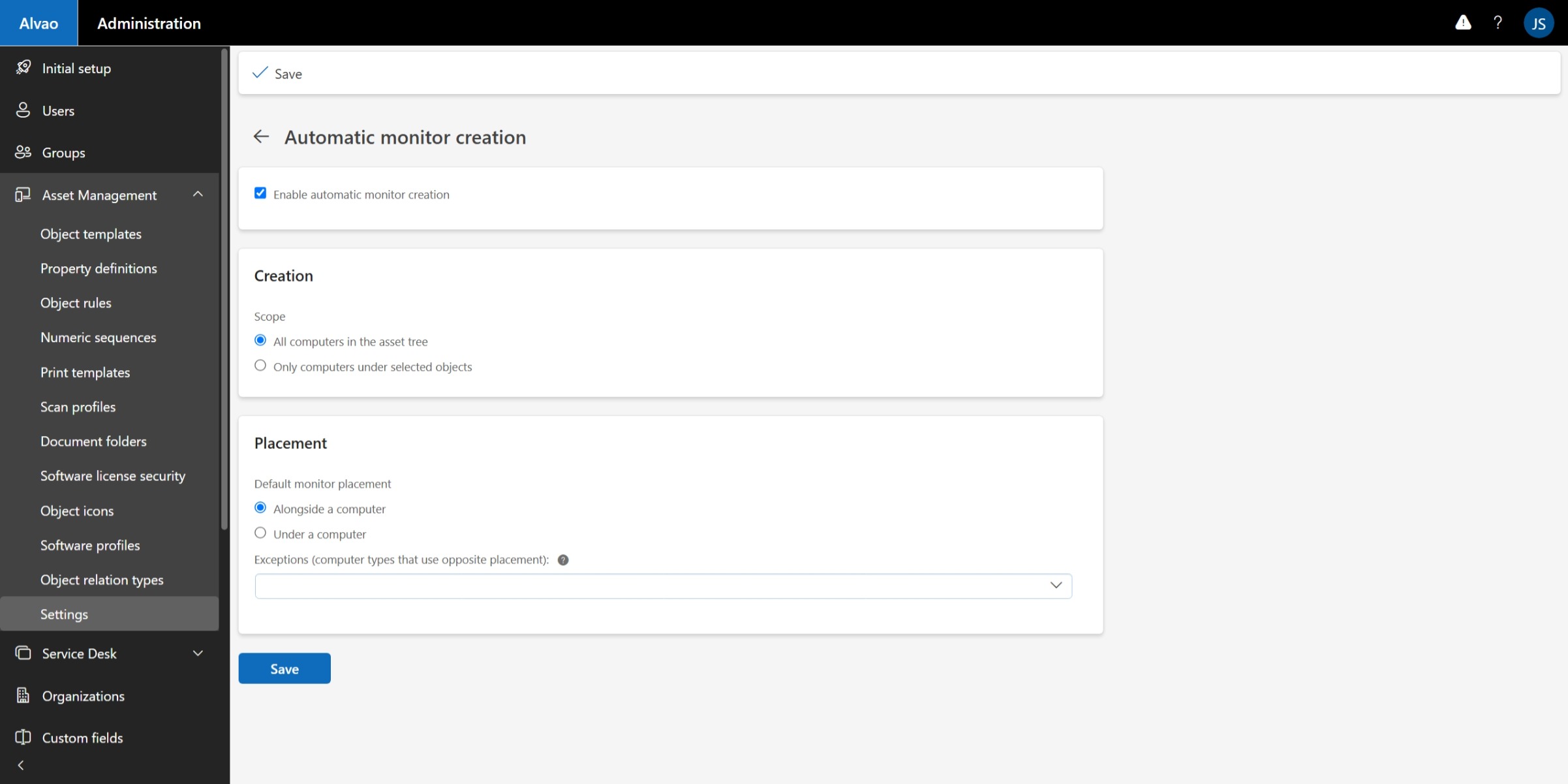
Když vaši agenti skenují počítače, ALVAO automaticky vytváří a aktualizuje záznamy o monitorech v databázi majetku. Žádné ruční zadávání po hromadných nasazeních. Žádné podivné monitory se nehromadí ve složce bez jasného vlastníka.
Každý monitor je zobrazen společně s počítačem, ke kterému je připojen, a s datem, kdy byl naposledy detekován.
Kde to pomáhá?
1. Nasazujete 500 počítačů — a jejich monitory
Nasazujete agenty po celé kanceláři. Každý stroj má jeden nebo dva monitory. Obvykle to znamená vytvořit a ručně propojit stovky záznamů o monitorech. S automatickým sledováním monitorů to za vás udělá ALVAO: monitory jsou vytvořeny a přiřazeny ke správnému počítači ve chvíli, kdy se spustí agent.
2. Potřebujete najít chybějící nebo přesunutý monitor
Monitor zmizí ze svého obvyklého místa – je odnesený domů, přesunutý na jiné místo nebo je prostě pryč. ALVAO zaznamenává, kdy byl každý monitor naposledy detekován, což usnadňuje identifikaci zařízení, která mohou chybět. Vytvořte vlastní pohled pro monitory, které nebyly viděny v posledních 14 dnech, a zaměřte se na majetek vyžadující pozornost. S ALVAO Asset Management Autopilot můžete dokonce spustit automatickou inventuru pro ověření jejich umístění dříve, než se z chybějícího monitoru stane nákladný problém.
3. Udržujte přiřazení monitorů aktuální
Pomocí pravidel objektů s ALVAO Asset Management Autopilot můžete automatizovat přiřazení monitorů. Když je monitor připojen k počítači jiného zaměstnance, ALVAO jej automaticky přiřadí novému uživateli, čímž udržuje vlastnictví majetku aktuální bez nutného manuálního zásahu.
4. Monitory pro domácí kancelář a hot desky, které by měly zůstat na místě
Některé monitory jsou osobní — domácí kancelářská zařízení, která se mění. Jiné jsou sdílené na hot desku nebo dokovacích stanicích. Označte je jako Soukromé nebo Sdílené a budou vyloučeny z automatických pravidel přesouvání a předávacích protokolů, takže nebudete dostávat falešná upozornění pokaždé, když někdo pracuje z domova nebo z hot desku.
Správa - jak nastavit automatické vytváření monitorů:
K dispozici nyní
Automatické sledování monitoru je k dispozici v ALVAO 26.3 a vyžaduje modul ALVAO Discovery Agent a ALVAO Inventory Audits.
Vyzkoušejte to po upgradu na 26.3 — rádi bychom obdrželi vaši zpětnou vazbu a zjistili, jak to funguje ve vašem prostředí.