A cleaner, lighter ALVAO: key information and actions within easy reach
Switching between tabs just to add a note to a device, or scrolling through an entire conversation to find one event in a ticket's history? These small frictions add up over a working day.
A modern, intuitive and user-friendly interface has long been one of our priorities. To keep ALVAO evolving with your needs, we're making some more noticeable changes to areas you already know well. The goal stays the same: make the application easier and more enjoyable to use, improve navigation and streamline everyday tasks.
Key notes
We design every change with the user in mind, so the information and actions you need are always close at hand. The more significant changes are being introduced gradually and refined based on your feedback.
What's changing in version 26.4:
- Clearer navigation, more accessible commands and better use of screen space
- Frequently used commands have been moved to more accessible places, so key actions are now just one click away
- Ticket templates are now available directly from the Tickets page, while My Assets has been moved to Assets, making related features easier to find
- Small UI improvements, such as new icons for tabs in ticket and asset details and updated Microsoft Fluent 2 components in forms, make the interface clearer and more consistent
What we're preparing in Insider Preview:
- Redesigned ticket tiles and an updated task detail header
- A new communication view with an event timeline for tickets
- Reworked object commands for easier access to frequently used actions
- Improved readability and easier access to information
- A redesigned Properties tab for objects
- Modernized entity details and ticket headers
See what’s changed in this video.
Resolving tickets from your daily queue
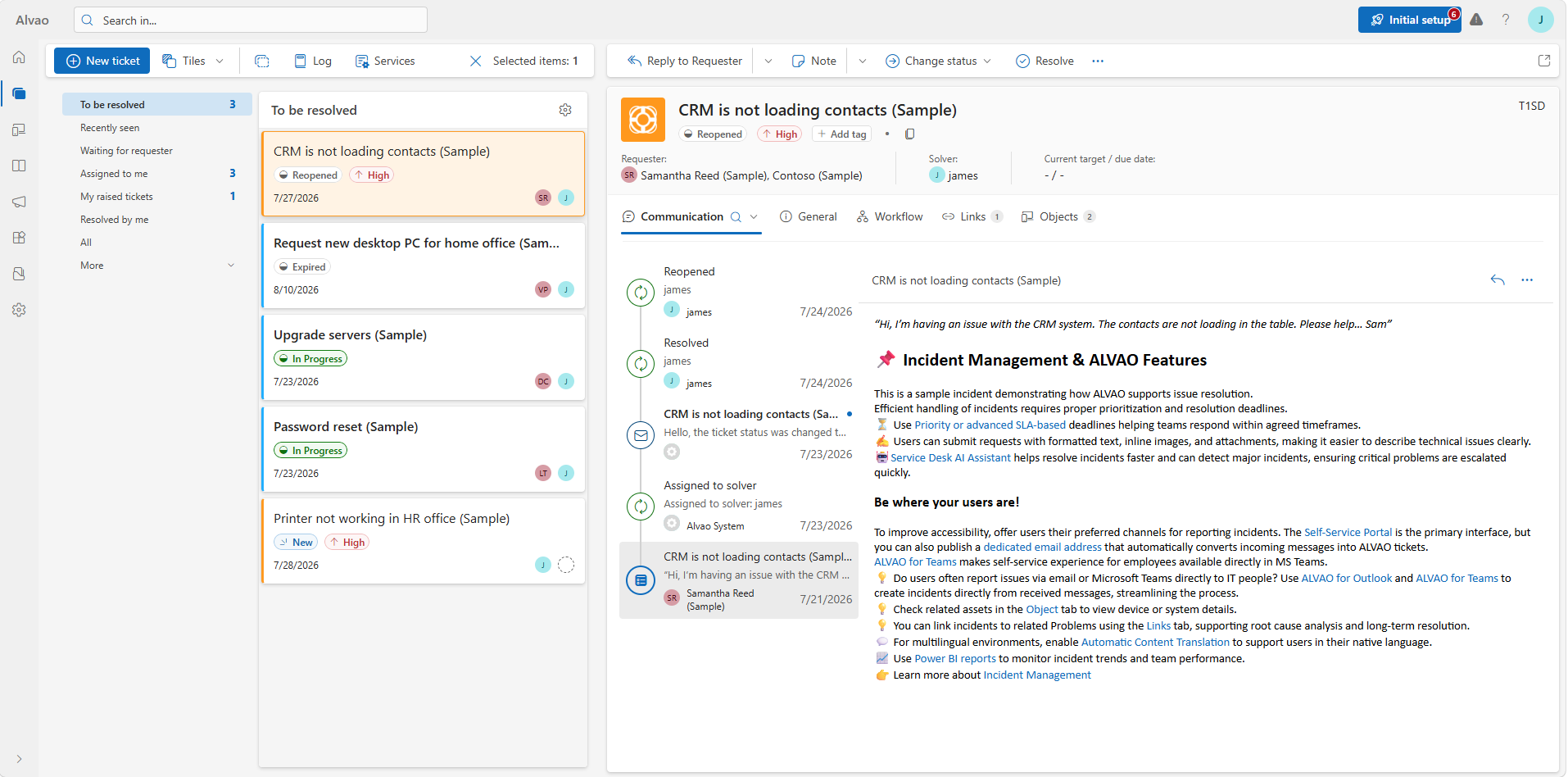
Situation: You're working through your queue and need to understand each ticket quickly, including what has already happened in the communication.
What you do: Open the ticket and check the updated tiles and header, which show status, priority, assignee and recent activity at a glance. Switch to the journal-style timeline to jump straight to the event you need.
What you gain: A quicker overview and easier navigation of a ticket's history, without scrolling through the entire conversation.
Updating an asset record (Insider Preview)
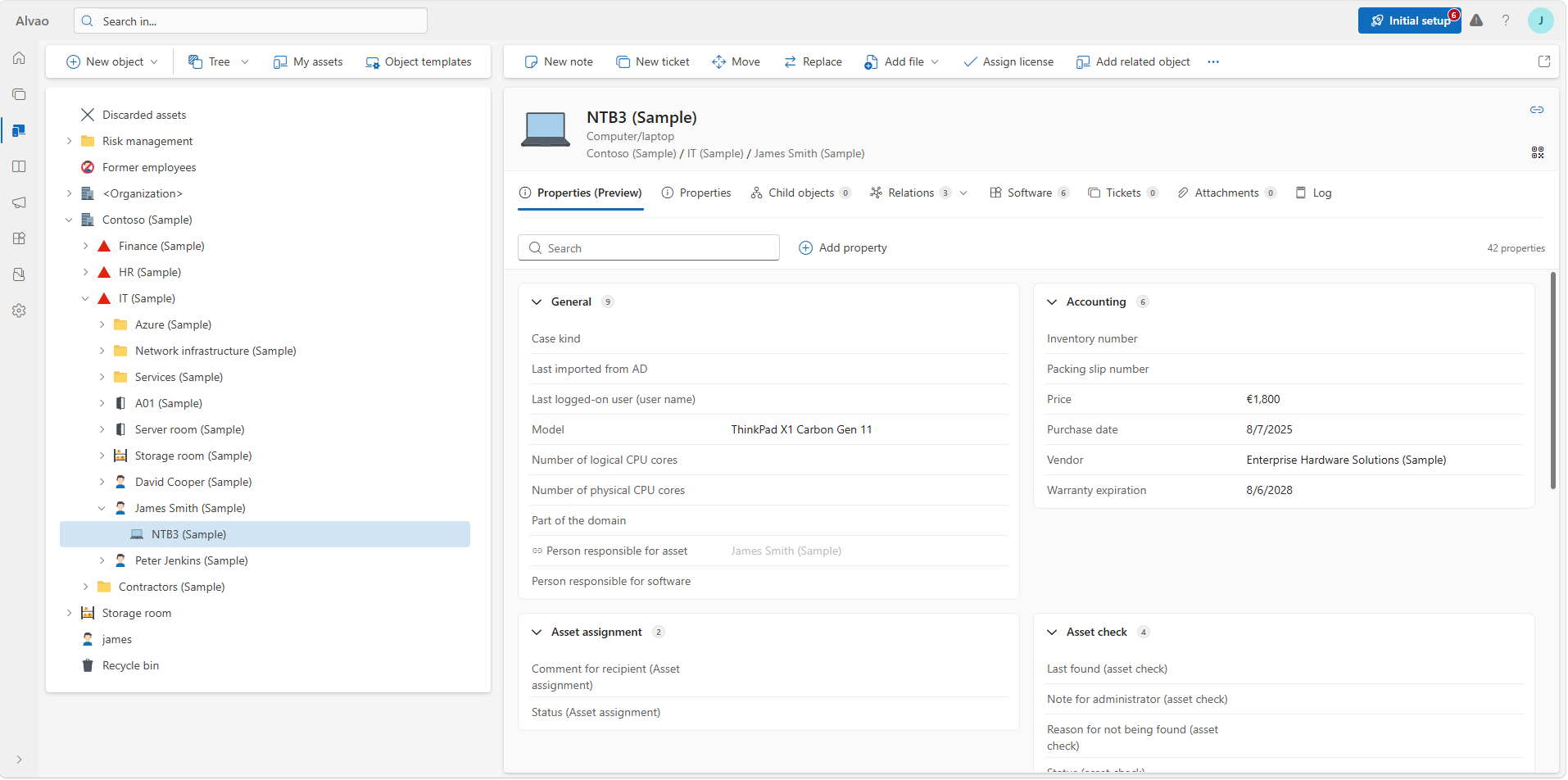
Situation: As an IT asset manager, you're reviewing a device before reassigning it. You need to record a note, create a related ticket and assign a license.
What you do: Open the object detail, where frequently used actions are now available in one place. The redesigned Properties tab groups information into logical sections, so the details you need are easy to spot.
What you gain: You create notes, open tickets and assign licenses faster, without switching between tabs.
Availability
The first improvements are available in ALVAO 26.4. The redesigned ticket view, communication timeline, Properties tab and entity details are available through Insider Preview. Some of these areas, especially the ticket view and object properties, are still being designed, so the final look and feel may change based on your feedback. Further enhancements will follow in future releases.
If you'd like to be among the first to try these upcoming changes, get in touch with our Product Analyst, Markéta. Thank you for helping us make ALVAO even better.