Assign ticket to solver by their availability
You assign a ticket to a solver, confident it will be handled on time — only to discover later they were on holiday, stuck in back-to-back meetings, or not even on shift. Verifying availability across Outlook, Microsoft Shifts, and ALVAO before every assignment adds friction and still leaves room for error. To address this, we introduced availability-aware assignment, a new way to see solver availability signals directly inside the ALVAO assignment flow.
What it does
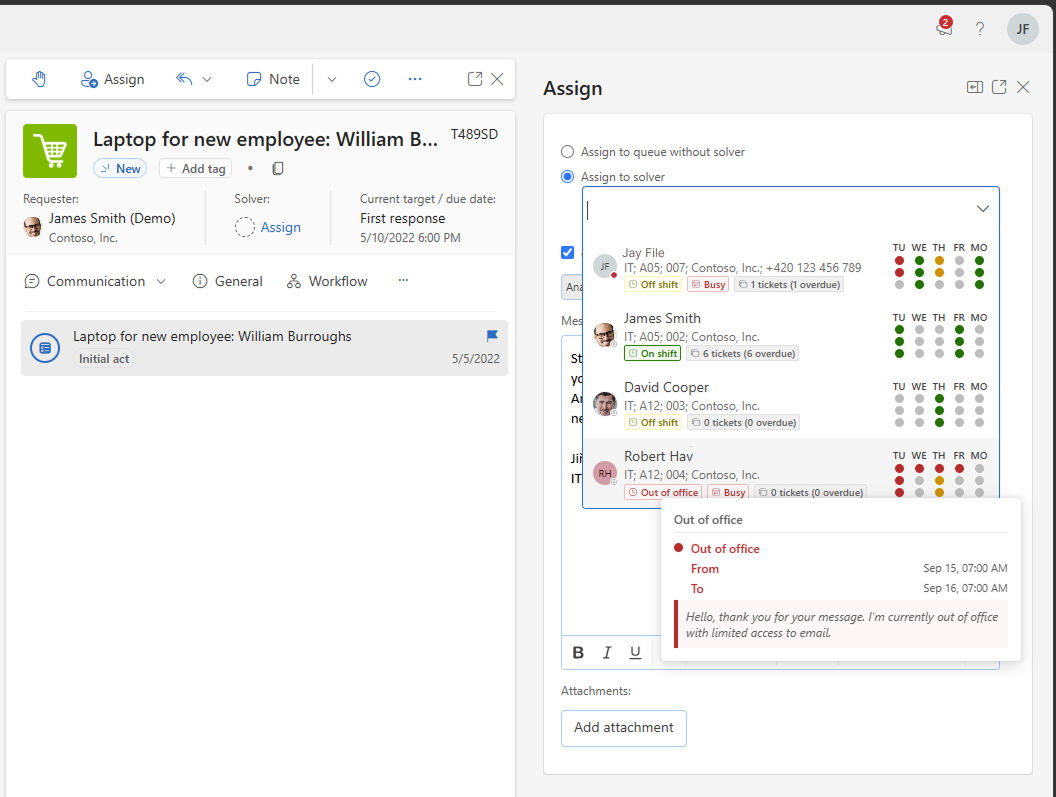
Availability-aware assignment brings together signals from Microsoft Outlook (automatic replies and calendar event statuses), Microsoft Shifts, and Microsoft Teams (the user's presence status, the colored dot next to their picture) directly into the ticket assignment dialogue in ALVAO. When you open the solver picker, you can see at a glance whether each candidate is out of office, working elsewhere, off shift, or carrying a heavy calendar load — all without leaving ALVAO. The availability signals also take into account each solver's workload, meaning how many requests they currently have and how many of them are overdue, as well as ticket due dates. Event subjects, meeting titles, and descriptions are never shown, keeping the display privacy-safe and focused on what matters for assignment.
The feature is designed for service managers and team leads who assign incoming tickets and need to balance workload and availability across their team. It works alongside existing ALVAO workload indicators such as overdue and total open ticket counts. The solver list is reordered so that available candidates appear first, while all solvers remain selectable — the decision stays with you.
How it helps in real life
Avoiding assignment to an absent solver
Situation: An urgent ticket arrives with a tight SLA. You open the assignment dialogue and notice that your usual first-choice solver has an active out-of-office automatic reply and will not return until after the deadline.
What you do: Glance at the availability signals shown next to each solver's name. You immediately see who has an active out-of-office, who is working elsewhere, and who is fully clear. You select a colleague with no blocking signals and assign the ticket with one click.
What you gain: The ticket lands with someone who can action it immediately, reducing the risk of an SLA breach — and you saved the time you would have spent switching to Outlook to check calendars manually.
Assigning across a shift-based team
Situation: Your service desk runs in shifts. A new ticket comes in mid-afternoon and needs to go to someone who is currently on shift and not already overloaded with open tickets.
What you do: Open the assignment dialogue. The solver list is reordered so that on-shift team members with lighter workloads appear at the top. Microsoft Shifts data confirms who is scheduled to work right now, shown alongside each solver's current open and overdue ticket counts from ALVAO.
What you gain: You assign the ticket confidently in seconds, knowing the solver is actively working and able to pick it up promptly — no manual cross-referencing of shift rosters required.
Administration and setup
Administrators can control which user groups are included in availability data synchronization using a configuration setting in ALVAO. External signals from Outlook and Microsoft Shifts refresh approximately every 60 minutes; ALVAO-native workload figures are updated in near real time.
Available now
Available in Preview, Start edition.
We'd love to hear how you use it and what improvements would make it even more useful.